Stop Chasing Payments: Professional Receipts Made Easy
Let’s face it: the creative side of running a business is fun, but the administrative side? Not so much. If you are a freelancer, a small business owner, or a creative agency, you know the drill. You finish a beautiful project, send a quick email asking for the money, and then wait. You wait until you realize you forgot to include your bank details, or perhaps the client is disputing the hours because your notes were messy. This is where the friction happens between delivering great work and getting paid for it. We often spend hours perfecting our brand identity and marketing materials, but when it comes to the final step—the invoice and receipt—we settle for a plain text email or a generic spreadsheet row. That inconsistency can hurt your professional image.
The Power of Consistent Documentation
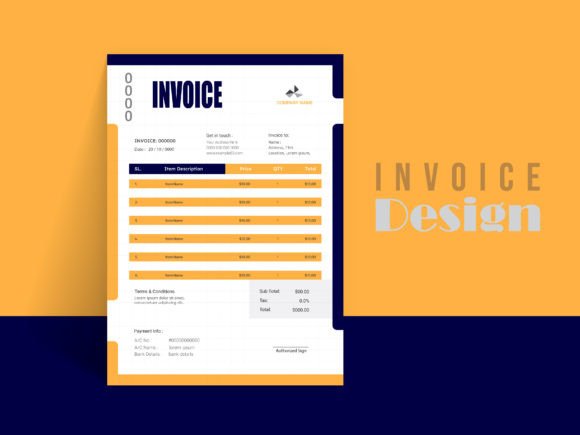
Think of your financial documents as the final piece of your brand identity. When a client receives a beautifully designed invoice that matches the aesthetic of the website or logo you just built for them, it reinforces the quality of your work. It tells them, "I care about the details." This specific collection of Payment Receipt Templates is designed exactly for that purpose. It isn't just a bill; it is a tool to help you list and count every piece of a project. Whether you are itemizing hours of design work, listing physical products, or charging for advertising space, having a structured document ensures nothing gets missed. It bridges the gap between a casual agreement and a formal business transaction, making it significantly easier for clients to process your payment without back-and-forth confusion.
From a design perspective, these templates act as a neutral yet stylish container for your financial data. The aesthetic leans towards a clean, modern look that balances whitespace with information density. It avoids the clutter of traditional accounting software while maintaining the seriousness required for financial records. The use of vector design elements means the lines and graphics remain sharp whether you are printing on a standard office printer or sending a high-res PDF. It strikes a balance between being professional enough for a corporate client and creative enough for a boutique studio.
Why File Format Matters for Your Workflow
One of the biggest hurdles with generic templates is the lack of flexibility. You open the file, try to change the font, and the whole layout breaks. This is why the technical specifications of these Payment Receipt Templates are so vital for a smooth workflow. The package includes AI, EPS, and JPEG files, covering the holy trinity of design software: Adobe Illustrator, Adobe Photoshop, and Microsoft Word.
If you are a designer, you will appreciate the well-organized layers in the Illustrator file. This allows you to dive deep into the customization, moving elements around to fit a specific editorial design layout if needed. For those who live in the Adobe ecosystem, the ability to edit the color mode is crucial. You aren't stuck with a generic blue or grey; you can match the hex codes exactly to your client's palette. The 300 DPI resolution ensures that if you ever need to print a physical copy for your records or hand it to a client in person, the text and graphics will be crisp and professional.
However, not everyone is a design wizard. This is where the Microsoft Word compatibility becomes a lifesaver. It allows entrepreneurs, marketers, and content creators who aren't fluent in Adobe software to still produce high-quality documents. You can open the file, type in your numbers, and save it as a PDF for email delivery. It removes the technical barrier to entry, allowing you to focus on the content of the invoice rather than struggling with the technology. This versatility makes it a valuable asset in your library of design assets, suitable for quick turnarounds when you need to bill a client immediately.
Practical Applications and Brand Perception
How does a receipt influence your business growth? It comes down to perception and organization. When you use a consistent template for all your financial interactions, you build a subliminal trust with your clients. It signals that you are organized, established, and serious about your craft. This is particularly important for small business owners and freelancers who might be competing against larger agencies. A polished receipt can make a one-person operation look just as established as a ten-person firm.
Consider the practical application of these Payment Receipt Templates across different industries. A photographer can use it to break down the costs of a shoot, including licensing fees and printing costs. A social media manager can use it to detail monthly management fees and ad spend. Even hobbyists selling crafts on platforms like Etsy or at local markets can benefit from having a standardized way to confirm receipt of goods. The A4 size with bleed setting is particularly helpful here; it ensures that if you do decide to print physical copies for a trade show or a client meeting, the ink goes right to the edge of the paper for a professional, borderless look.
Furthermore, the ability to customize the file means you can adapt it for different clients or different projects. You might use a darker, more corporate color scheme for a B2B tech client, but switch to a softer, pastel palette for a lifestyle brand. This flexibility allows you to maintain a consistent level of quality while still tailoring the experience to the specific relationship. It turns a mundane administrative task into a touchpoint for brand reinforcement.
Maximizing Your Investment
To get the most out of these templates, treat them as a starting point rather than a rigid constraint. Here are a few practical tips for implementation:
- Font Pairing: The templates utilize free fonts, which is excellent for keeping costs down. However, don't be afraid to swap these out for your primary brand typeface if you have one. Just ensure the font pairing remains legible. A clean sans serif font usually works best for the numerical data to ensure clarity, while a serif font or script font can be used for headers to add a touch of personality.
- Scalability: Because the design is vector based, you can scale elements up or down. If you have a long list of items, you can reduce the size of the logo or header area to make more room for the table. Conversely, if it’s a simple service, you can enlarge the design elements to make the page feel less empty and more impactful.
- Digital vs. Print: While the file is print ready, most transactions today are digital. When saving your final file from Illustrator or Photoshop, export a high-quality PDF. This preserves the layout and fonts regardless of what device your client opens it on. It also allows you to flatten the layers, preventing accidental edits by the recipient.
Ultimately, the goal is to make the payment process as seamless as possible. A confusing invoice leads to delayed payments. A clear, well-designed receipt leads to faster cash flow and happier clients. By investing a small amount of time upfront to customize these Payment Receipt Templates, you save yourself countless hours of administrative headache down the road. It is about working smarter, not harder, and ensuring that every aspect of your business reflects the quality of your work. Whether you are a seasoned graphic designer or a startup founder wearing all the hats, having a reliable, editable, and professional template in your toolkit is not just a convenience—it is a necessity for sustainable business growth.