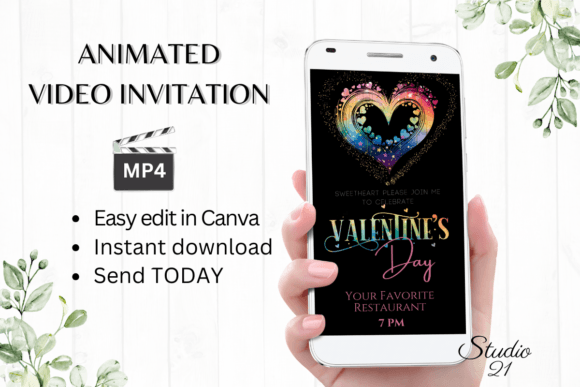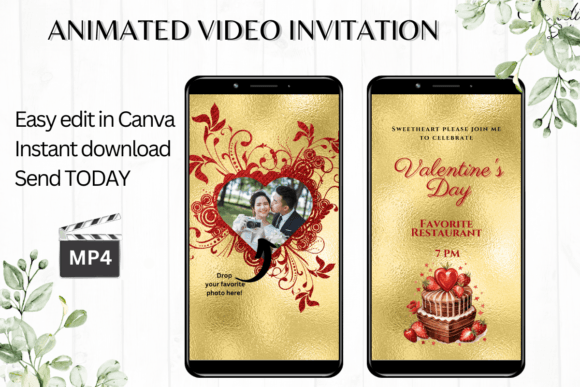
Photo Valentine's Day Invitation: Digital Animated Video Invitation Template
Creating a memorable Valentine's Day invitation shouldn't require a design degree or a week of back-and-forth with a graphic designer. The Photo Valentine's Day Invitation template changes the game by offering a polished, professional digital animated video invitation that you can download, edit, and send within minutes. Whether you're planning an intimate dinner party, a Galentine's brunch, or a community event, this template gives you immediate access to a customizable design directly in Canva.
What Makes This Digital Invitation Stand Out
This isn't your typical static card. The Photo Valentine's Day Invitation is a dynamic, animated video template designed at 1080 x 1920 pixels—the ideal vertical format for mobile viewing and social sharing. The animation brings your invitation to life with subtle motion that catches the eye without overwhelming the message. Think of it as a modern typography approach to event invitations: clean, engaging, and built for how people actually consume content today.
The template balances romantic aesthetics with contemporary design sensibilities. You'll find carefully chosen font pairings that blend script and sans serif elements, creating visual hierarchy that guides the viewer's eye from the headline to the event details. The overall personality strikes that sweet spot between elegant and approachable—polished enough for a formal gathering but warm enough for a casual celebration.
Practical Editing Without the Learning Curve
One of the biggest advantages of this Photo Valentine's Day Invitation template is the editing experience. There's no software to download, no fonts to install, and no technical hurdles to clear. You open the template in Canva—either on your desktop or through the mobile app—and start personalizing immediately.
The customization options cover everything most people need:
- Text personalization — Add your event details, delete placeholder text, or restructure the information layout entirely
- Font adjustments — Change font style, color, and size to match your personal taste or event theme
- Text effects — Modify shadows, outlines, or other styling to make key details pop
- Animation tweaks — Adjust the motion style if you want a different energy for your invitation
- MP4 download — Export your finished design as a video file ready for sharing
This flexibility matters because every event has its own personality. A Valentine's Day cocktail party calls for different visual energy than a kids' classroom party or a couples' workshop. The template adapts to these scenarios without requiring you to start from scratch.
Sharing Your Invitation Across Platforms
Once you've personalized your Photo Valentine's Day Invitation, sharing it is straightforward. Download the MP4 file and distribute it through text messages, Messenger, iMessage, WhatsApp, or any messaging platform that supports video. For a more formal approach, Canva also lets you generate a shareable link you can include in email invitations.
The vertical 1080 x 1920 format works particularly well on mobile devices, which is where most people will view your invitation anyway. This format consideration reflects thoughtful design planning—understanding that digital invitations live primarily in messaging apps and social feeds rather than on desktop screens.
For small business owners, event planners, or content creators who host regular events, this template approach saves significant time and money compared to commissioning custom designs for every occasion. The brand identity stays consistent when you use the same template family across multiple events, just swapping details each time.
Who Benefits Most From This Template
This Photo Valentine's Day Invitation template serves a wide range of users, but certain groups will find particular value in its approach:
Small business owners and entrepreneurs hosting Valentine's promotions or customer appreciation events can maintain a professional appearance without hiring a designer for every occasion. The template functions as a reusable design asset in your marketing toolkit.
Content creators and bloggers who need to promote events to their audience benefit from the animated format, which stands out in crowded social media feeds far better than static graphics. The motion element increases engagement and makes your invitation more shareable.
Event planners and marketers managing multiple clients or events appreciate the speed factor. When you can produce a polished invitation in minutes rather than hours, you free up time for other aspects of event management.
Individuals and families planning personal celebrations get access to design quality that typically requires professional help. The Canva interface is intuitive enough that anyone comfortable with basic apps can produce impressive results.
Design Considerations and Best Practices
When customizing your Photo Valentine's Day Invitation, keep a few design principles in mind. First, resist the urge to change everything. The template was built with intentional font pairings and color relationships—modifying one or two elements usually works better than overhauling the entire design.
Pay attention to readability when adjusting text sizes or colors. Your event details—date, time, location, RSVP information—need to be legible at a glance. Dark text on light backgrounds or light text on dark, uncluttered areas ensures your message gets through clearly.
Consider your audience when choosing final design decisions. A sophisticated dinner party invitation might lean into elegant serif font styling and muted tones, while a casual gathering could benefit from bolder colors and a more playful script font treatment. The template provides the structure; your choices make it personal.
Remember that colors may appear slightly different depending on the device viewing your invitation. This is standard across digital design, but it's worth testing your final MP4 on a couple of different screens before sending it out widely.
What You Receive and Getting Started
Your download includes a PDF with a direct link to the Canva template and a user guide with clear Canva instructions. No physical product ships—everything is digital, which means you can start editing the moment your purchase completes. The template remains accessible in your Canva account indefinitely, so you can revisit and modify it whenever needed.
This Photo Valentine's Day Invitation template represents a practical solution for anyone who wants professional-quality digital invitations without the professional price tag or timeline. It respects your time, works within tools you likely already use, and delivers a final product that looks genuinely polished. For your next Valentine's Day event, that combination is hard to beat.